GuidePrompting · all models

How to write AI image prompts

The six-slot formula for Gen NanoBanana Create

Short answer

Strong prompts are creative briefs, not vibes. Fill six slots — subject, style, environment, lighting, composition, and technical constraints — then match the model to the job. The examples below copy straight into the workbench.
Copyable examplesModel-specific tipsReference images
Gen NanoBanana AI image prompting example — e-commerce product hero with studio lighting and model silhouette
Foundation

The six-slot prompt formula

Every slot you skip gets filled with a generic default. Omit on purpose — not because you forgot.

Subject

Who or what is in frame — product SKU, character, object, or scene anchor. Name materials, colors, and proportions instead of vague adjectives like “beautiful.”

Style / medium

Pick one lane: editorial photography, watercolor, 3D render, film still, flat vector, etc. Mixing contradictory styles (“realistic anime oil painting”) dilutes the result.

Environment

Where the subject lives — pure white studio sweep, marble countertop, neon alley, coastal cliff. State background color or surface when marketplace compliance matters.

Lighting

The single biggest quality lever. Use photography terms: softbox from upper left, golden hour rim light, overcast diffusion, neon practicals, Rembrandt key.

Composition / camera

Framing and lens language: low-angle three-quarter view, 85mm portrait, 35mm environmental, shallow depth of field, subject in left third, product fills 85% of frame.

Technical + constraints

Aspect ratio, resolution tier, and guardrails: “no watermark, no extra logos, legible label text only as quoted.” Lock these before you batch variations.

Cheat sheet

One-line formula

[Subject] + [Style / medium] + [Environment] + [Lighting] + [Composition / camera] + [Technical constraints]
Copy & paste

Three prompts that work

Product, portrait, and reference-guided character templates — swap bracketed details, keep the structure.

E-commerce product hero

NanoBanana Pro · 2K · 1:1 · product reference optional

Example prompt

Studio product photograph of a frosted glass skincare dropper bottle with pearlescent white label and silver cap, subtle teal accent on the cap ring. Bottle centered on cool gray marble surface. Diffused softbox lighting from upper left, gentle shadow under base, shallow depth of field with orchid petal softly out of focus in background. Premium commercial photography, accurate glass refraction and label geometry. Pure background suitable for Shopify hero crop. No watermark, no unrelated logos, no distorted packaging.
NanoBanana Pro result: premium ecommerce hero with lifestyle props, glossy reflections, and consistent brand palette

Sample output

Tip: Attach a product reference when label geometry must stay accurate. NanoBanana 2 is ideal for multi-reference iteration; NanoBanana Pro for premium hero shots like the sample output.

Night portrait (model comparison prompt)

Seedream 4.5 · 2K output · 3:4 portrait · no reference images

Shared prompt

Low quality, blurry night selfie. Super close up, extra details. Influencer aesthetics. The image presents a striking vertical composition where the modern urban landscape meets the tranquil dark of the water, centered on a young woman of mesmerizing elegance (supermodel face). Standing at the edge of a concrete promenade, she possesses a lithe and slender build that harmonizes with the verticality of the surrounding architecture. Her skin, characterized by a porcelain fairness reminiscent of Northern European frost, glows with an ethereal quality against the nocturnal backdrop. Her features exhibit a flawless, symmetrical beauty; high cheekbones frame a face of delicate poise, while her gaze, framed by long lashes, carries a quiet, captivating depth. Her lips are full and softly tinted, and her hair, a luminous cascade of platinum blonde, falls gracefully over her shoulders, catching the ambient city light. She is dressed in a form-fitting, sleeveless mini dress of a pale cream or off-white hue, adorned with a subtle, fine pattern that adds a touch of intricate texture to her silhouette. A thin gold necklace rests against her collarbone, and a pink strap from a bag hangs over her shoulder, providing a soft pop of color. The environment around her is a symphony of light and shadow. Behind her, the dark, rippling waters of a river or bay reflect the shimmering golds, blues, and whites of the city’s skyline. To the left, a massive concrete pier or elevated transit track cuts across the upper frame, its underside traced by a vibrant line of multi-colored neon light. The background is a dense collection of high-rise buildings, their windows glowing with the activity of the night. One notable skyscraper stands out with purple and blue illumination, while others disappear into the soft, dark clouds of the night sky. The overall scene is one of contemporary grace, blending the sharp lines of metropolitan life with the timeless, radiant allure of the central figure.
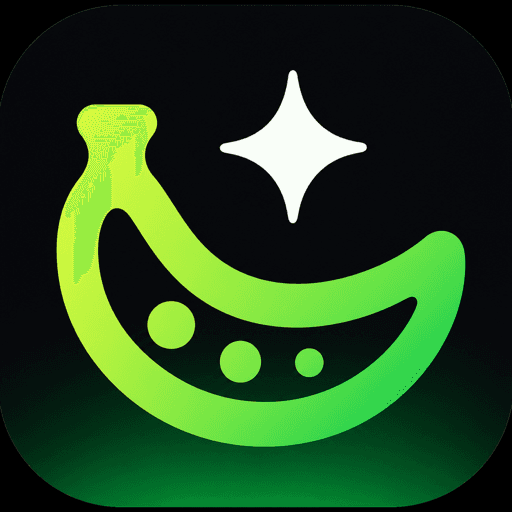
Gen NanoBanana AI image model comparison — Seedream 4.5 ByteDance output: nighttime waterfront portrait selfie, soft smile, smooth cinematic skin, embroidered top detail, purple-accent skyline

Sample output

Tip: This is the exact prompt from our model comparison guide — copy it verbatim, then swap only the model in Create to see how each engine interprets the same brief. See all five model outputs →

Character consistency with references

NanoBanana 2 · 2K · 3:4 · 1–3 reference portraits attached

Example prompt

Young woman in a red jacket walking on an urban sidewalk at golden hour, candid street photography. Keep face, hair color, and outfit consistent with the attached reference portraits. Natural skin texture, shallow depth of field, warm rim light from the setting sun, pedestrians softly blurred in background. Documentary editorial mood. No text overlays, no watermark.
NanoBanana 2 result: same character in new urban background and walking pose, outfit and face consistent with reference

Sample output

Tip: Attach one to three reference stills before you generate — NanoBanana 2 accepts up to fourteen. Describe only what should change (pose, background, lighting); let references carry identity.

Model dialects

Same formula, different strengths

All five models share one workbench — tune the prompt emphasis to match each engine.

ModelPrompt dialectBest forStudio
NanoBananaConcise prose — one clear subject, one lighting choice, flat-rate draftsFast idea checks and simple edits before you spend credits on higher tiersOpen →
NanoBanana 2Descriptive paragraphs + up to 14 reference stills for identity and palette1K–4K iteration, character consistency, and multi-variation batchesOpen →
NanoBanana ProLayout-aware prose with quoted text blocks and margin/grid languagePosters, slides, packaging mockups, and photoreal scenes with sharp typeOpen →
Seedream 4.5Cinematic scene briefs — environment, mood, and spatial relationshipsCampaign heroes, poster design, and reference-guided wardrobe or background swapsOpen →
GPT Image 2Instruction-style sentences; quote label text verbatim; quality tier maps to resolutionLegible multilingual typography, photoreal edits, and strict prompt adherenceOpen →

Not sure which model to start with? See our model comparison on one shared prompt, or NanoBanana 2 vs Pro for tier-specific picks.

In Create

Workflow on Gen NanoBanana

From blank prompt to repeatable catalog runs — references and style presets included.

Draft & set up in Create

Fill the six slots — subject, style, environment, lighting, composition, and constraints. Pick your model, attach reference stills, or open a style preset from the prompt library when identity matters.

Generate a control image

Run a single 2K frame in the workbench. If the output misses, change only one slot — usually lighting or composition — before rewriting the whole prompt.

Batch with locked settings

Once the control looks right, duplicate the prompt list or resolution tier for variants. Keep aspect ratio and model fixed so comparisons stay fair.

References & presets

NanoBanana 2 · up to 14 reference stills · prompt library

When product geometry, character identity, or brand palette must stay stable, attach reference stills in Create — NanoBanana 2 accepts up to fourteen. For look-and-feel, open a curated style preset from the prompt library, tune the text, then lock aspect ratio and resolution while you iterate lighting or composition.

Avoid

Common prompt mistakes

Fix the highest-leverage slot first — usually lighting, composition, or quoted text.

One-word subjects

"A cool dragon" forces the model to invent everything. Name scale, material, pose, and environment instead.

Contradictory styles

"Hyperreal watercolor vector photo" averages into mush. Commit to one medium per generation.

Missing lighting

Without a light source, models default to flat noon daylight. Name direction, quality, and color temperature.

Rewriting everything on a miss

If framing is wrong, edit composition only. If skin is waxy, edit lighting only. Single-variable iteration saves credits.

Skipping references

When SKU geometry, character face, or brand palette must persist, attach references on NanoBanana 2 or Pro instead of over-describing in text.

Unquoted poster text

For signs and packaging, put exact strings in quotes and forbid extra words in the constraints slot — then pick Pro or GPT Image 2.

Frequently asked questions

How long should an AI image prompt be?

Most production prompts land between 40 and 120 words — enough to fill all six slots without stuffing twelve adjectives into one sentence. Gen NanoBanana models respond to clear prose; keyword spam is not required.

Do I need negative prompts on Gen NanoBanana?

You do not use a separate negative-prompt field in Create. Instead, add constraint lines in the technical slot: "no watermark, no extra logos, no distorted hands, no text unless quoted." Instruction-tuned models like NanoBanana and GPT Image 2 follow these well.

Can I reuse the same prompt across all five models?

Yes — that is how our model comparison guide works. Expect different interpretations: NanoBanana for speed, NanoBanana 2 for references, Pro and GPT Image 2 for typography, Seedream 4.5 for cinematic campaigns.

Which model is best for product photography prompts?

Start with NanoBanana 2 when you have a product reference and need accurate geometry at 2K or 4K. Use GPT Image 2 when labels must stay legible; use NanoBanana for fast layout exploration before a final Pro render.

How do style presets help?

Presets from the Gen NanoBanana prompt library inject curated look-and-feel text into your prompt before you generate. Tune the wording in the workbench, then lock settings while you iterate on subject and lighting.

Where do I paste prompts in Gen NanoBanana?

Open the Create studio at /create, pick your model, paste into the prompt field, set aspect ratio and resolution, optionally attach references, then generate. Credits apply only on successful outputs.

More guides

Keep comparing

Evergreen pick-the-right-model guides with real outputs and credit context.

All models

Comparação de modelos

Compare NanoBanana, NanoBanana 2, Pro, Seedream 4.5, and GPT Image 2 on one nighttime portrait prompt.

Read guide
NanoBanana

NanoBanana 2 vs Pro

Resolution, text rendering, references, and cost — pick the right NanoBanana tier.

Read guide

Put the formula to work

Paste an example prompt into Create, pick a model, and iterate one slot at a time.