GuideUp to 14 references

AI reference images that keep identity stable

Characters, products, and brand palette on Gen NanoBanana

Short answer

Attach reference stills in Create when identity must survive a scene change. NanoBanana 2 accepts up to 14 references for characters and SKUs; use NanoBanana Pro or GPT Image 2 when typography or premium hero fidelity matters more than reference count.
Published Aug 11, 2026NanoBanana 2 · 14 refsReal before/after
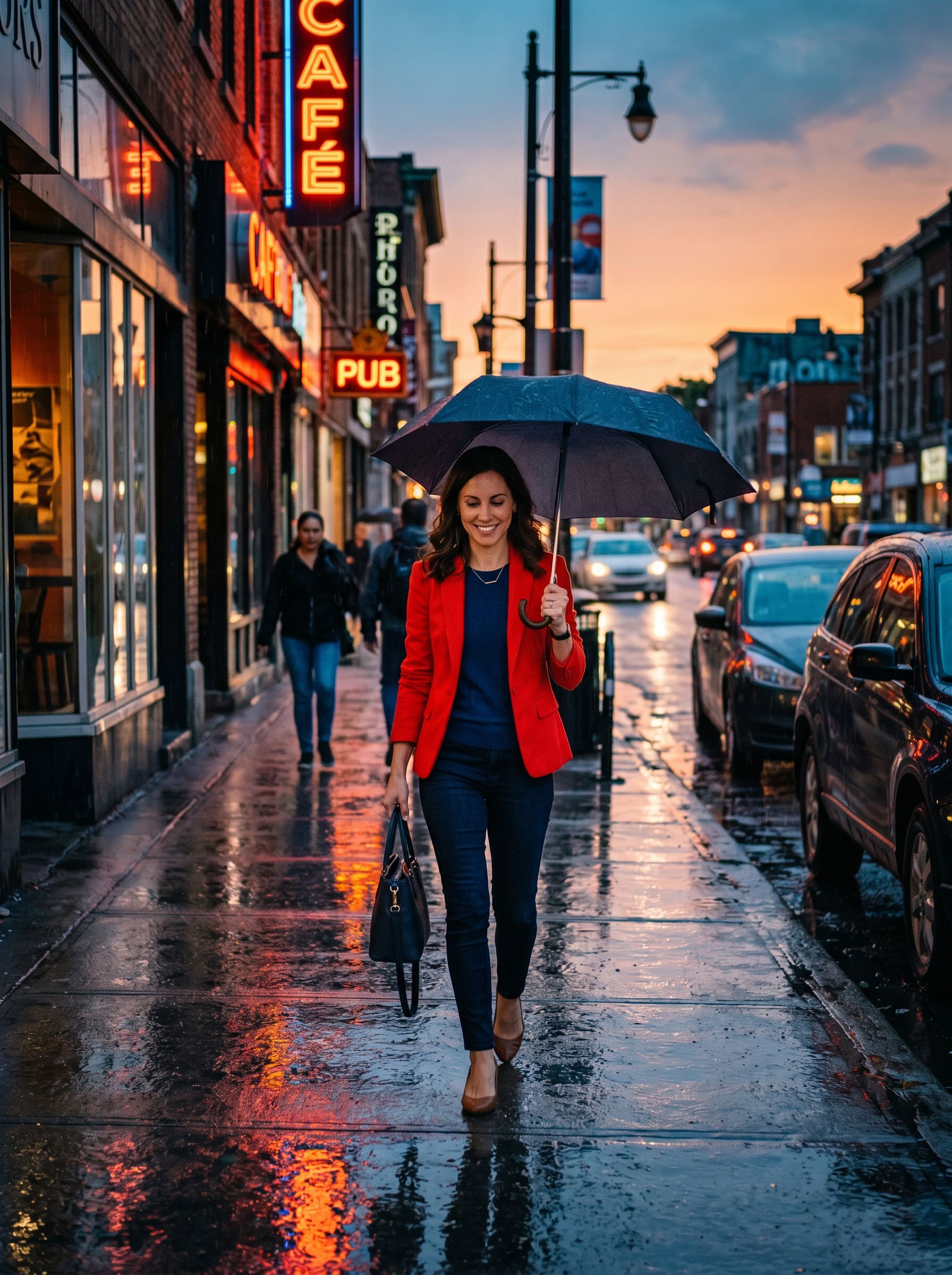
NanoBanana 2 result: same character in new urban background and walking pose, outfit and face consistent with reference
Answer first

Why use AI reference images?

References beat long identity paragraphs when the same person or SKU must appear across many scenes.

Lock identity, change the scene

References carry face, outfit, bottle shape, and label layout so your prompt only needs to describe what should change: pose, background, lighting, or camera.

Fewer wasted generations

Text-only prompts drift across batches. A single clear product or portrait still cuts retries when you need catalog consistency.

Works with Auto aspect matching

On NanoBanana 2, Auto can match reference framing so crops stay consistent across lifestyle variants and colorways.

Same wallet as image and video

Reference-guided image runs share credits with Veo, Sora, and Seedance. Failed jobs do not charge.

Visual proof

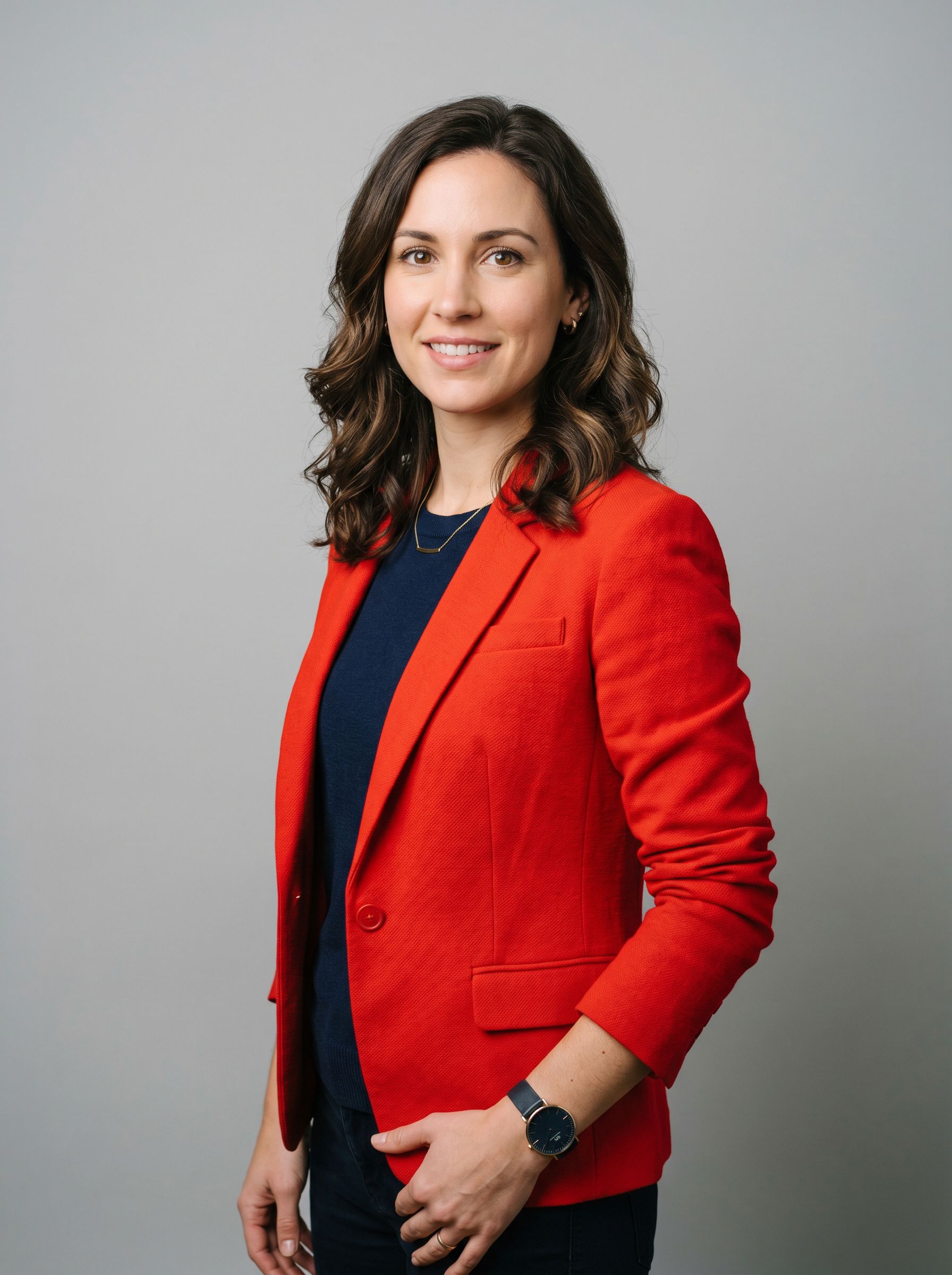
Same character, new scene

NanoBanana 2 sample: one portrait reference, then a walking pose in a new urban background.

Character reference before NanoBanana 2 — single portrait of woman in red jacket, neutral studio backdrop
Reference still
NanoBanana 2 result: same character in new urban background and walking pose, outfit and face consistent with reference
NanoBanana 2 output

Character consistency with references

NanoBanana 2 · 2K · 3:4 · 1–3 reference portraits attached

Example prompt

Young woman in a red jacket walking on an urban sidewalk at golden hour, candid street photography. Keep face, hair color, and outfit consistent with the attached reference portraits. Natural skin texture, shallow depth of field, warm rim light from the setting sun, pedestrians softly blurred in background. Documentary editorial mood. No text overlays, no watermark.
NanoBanana 2 result: same character in new urban background and walking pose, outfit and face consistent with reference

Sample output

Tip: Attach one to three reference stills before you generate — NanoBanana 2 accepts up to fourteen. Describe only what should change (pose, background, lighting); let references carry identity. Six-slot formula →

Model picks

Which model for reference images?

Reference capacity and best-fit jobs at 2K credit quotes.

ModelReferencesBest forCredits (2K)Studio
NanoBanana 2Up to 14Character identity, multi-angle products, palette lock across batches68NanoBanana 2
NanoBanana ProReference-guidedPremium heroes, sharp fabric and reflections after you lock the look101NanoBanana Pro
GPT Image 2Reference editsPackaging and slides where quoted label text must stay legible86GPT Image 2
Seedream 4.5Multi-referenceCinematic campaign swaps with poster-style color grading27Seedream 4.5
NanoBananaOptionalFast layout tests before you spend credits on multi-ref 2K/4K runs27NanoBanana

Compare raw aesthetics in our five-model image comparison, or learn the six-slot prompt formula.

Create studio

How do you use reference images on Gen NanoBanana?

A repeatable path from stills to catalog-ready batches.

Pick the stills that define identity

Use sharp, well-lit photos. For people: face + full outfit. For products: front packshot plus one angle or label close-up. Avoid heavy filters or tiny crops.

Attach references in Create

Open NanoBanana 2 for up to fourteen stills. Add only what you need: one hero reference often beats a noisy stack of similar frames.

Prompt the change, not the identity

Say what moves: walking pose, kitchen counter, golden hour rim light. Explicitly tell the model to keep face, hair, outfit, or SKU geometry consistent with the attachments.

Generate a control frame at 2K

Review identity first. Fix lighting or composition before you batch colorways, outfits, or 4K exports. Credits apply only on success.

Escalate model when needed

Once NanoBanana 2 locks the look, rerun keepers on NanoBanana Pro for hero polish or GPT Image 2 when packaging type must stay readable.

Ready to attach references?

Open NanoBanana 2, upload your stills, and generate a 2K control frame.

Playbooks

Common reference-image workflows

Match the stack to the job: character, product, brand, or edit.

Character consistency

1–3 portrait references, NanoBanana 2, 3:4. Describe pose and location only. Keep hair color, face, and wardrobe language tied to the attachments.

Product / SKU lock

1–14 packshots. Quote materials and forbid extra logos. Ideal for Shopify variants and Amazon lifestyle crops after a white-background control frame.

Brand palette lock

Attach logo sheet or packaging stills plus a mood board. Prompt the new scene while naming brand colors you must preserve.

Before → after edits

Upload the source still as the primary reference and describe the edit: background swap, outfit change, cleaner label. Pro and GPT Image 2 shine here.

Avoid

Common reference-image mistakes

Small curation habits prevent most identity drift.

Over-describing the subject

If a reference already shows the face or bottle, long identity paragraphs fight the image. Describe the delta instead.

Blurry or conflicting references

Mixed lighting, cropped faces, or two different people in one stack confuse the model. Curate before you generate.

Skipping constraints

Add “no watermark, no extra logos, keep label text only as quoted” when marketplace or packaging compliance matters.

Jumping to 4K too early

Prove identity at 2K first. Upscale or re-render keepers at 4K once the control frame is right.

Frequently asked questions

How many AI reference images can I use on Gen NanoBanana?

NanoBanana 2 accepts up to 14 reference images per run. Other image models support reference-guided edits with smaller practical stacks. Seedance 2.0 video supports up to nine references on supported modes.

What are AI reference images used for?

They anchor subject identity (face, outfit, product geometry, brand palette) so the model can change pose, scene, or lighting without reinventing the subject from text alone.

Which model is best for multi-reference character consistency?

Start with NanoBanana 2. Escalate finished keepers to NanoBanana Pro for premium detail, or GPT Image 2 when on-image text must stay accurate.

Do reference images cost extra credits?

No separate fee. You pay the model’s quoted credits for a successful generation. Failed runs do not charge.

Can I reuse a prompt library style with references?

Yes. Open a preset from /prompts, attach your own stills in Create, and keep the preset prompt as a starting point for lighting and mood.

Where do I upload reference images?

In the Create studio at /create, or on a dedicated model page such as /ai-image-nano-banana-2. Upload from your device or reuse library assets when available.

More guides

Keep comparing

Evergreen pick-the-right-model guides with real outputs and credit context.

E-commerce

AI product photos

Which Gen NanoBanana model for Shopify and Amazon heroes — copyable prompts, references, upscaler, and background remover workflow.

Read guide
Prompting

AI image prompting

Six-slot prompt formula with copyable product, portrait, and reference-guided character examples for all five Gen NanoBanana image models.

Read guide
All models

Model comparison

Compare NanoBanana, NanoBanana 2, Pro, Seedream 4.5, and GPT Image 2 on one nighttime portrait prompt.

Read guide
NanoBanana

NanoBanana 2 vs Pro

Resolution, text rendering, references, and cost — pick the right NanoBanana tier.

Read guide
Comparison

Seedream vs GPT Image 2

ByteDance Seedream 4.5 vs OpenAI GPT Image 2 on Gen NanoBanana — cinematic campaigns vs legible packaging text, credits, and sample outputs.

Read guide
Comparison

NanoBanana vs Midjourney

Honest comparison of Gen NanoBanana (NanoBanana family, Seedream, GPT Image 2) vs Midjourney for API access, credits, text, and cinematic aesthetics.

Read guide
Video

AI video comparison

Compare Veo 3.1 Lite, Sora 2, and Seedance 2.0 on Gen NanoBanana — durations, audio, references, credits, and sample clips.

Read guide
Tools

AI background remover

Standard vs NanoBanana Pro cutouts for Shopify and Amazon: credits, edge tips, and marketplace workflow on Gen NanoBanana.

Read guide
Comparison

NanoBanana vs Flux

Honest comparison of Gen NanoBanana (NanoBanana family, Seedream, GPT Image 2) vs Black Forest Labs Flux for credits, APIs, references, type, and photoreal pipelines.

Read guide

Try multi-reference in Create

Attach up to 14 stills on NanoBanana 2, prompt only the scene change, and pay credits only when the run succeeds.